Kids Pink Mockup Bella Canvas 3001Y
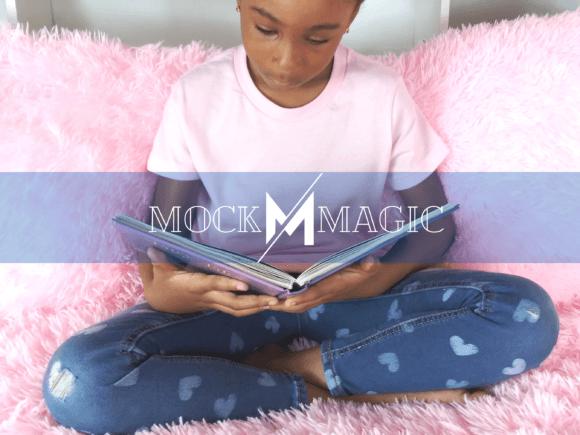
The Kids Pink Mockup Bella Canvas 3001Y is a high-resolution, watermark-free PNG digital download designed for creators who need to present youth apparel designs with authenticity and emotional resonance. It features a seven-year-old Black African American girl sitting on a soft pink bed, reading a book while wearing a pink t-shirt and heart-patterned jeans. This isn’t just a static image—it’s a production-ready visual asset built into real-world creative workflows: from early concept validation to client presentations, e-commerce listings, social media campaigns, or seasonal marketing launches.
Unlike generic templates or overused stock scenes, this mockup grounds your design in cultural specificity, age-appropriate styling, and intentional color harmony—pink as both aesthetic choice and symbolic anchor (Valentine’s Day warmth, back-to-school optimism, inclusive joy). Its utility emerges most clearly when you consider where it sits in your end-to-end process—not at the beginning as inspiration, nor at the end as final output, but as a critical bridge between ideation and execution.
Where It Fits in Your Creative Workflow
You’ll use the Kids Pink Mockup Bella Canvas 3001Y most effectively during the mid-phase of a design project—after sketching or digital drafting, but before final file handoff or print production. That’s when clarity matters most: does the design scale well on a child’s torso? Does the color pop against pink fabric? Does the composition feel natural on a real body, not just a flat canvas?
For small business owners launching a kids’ apparel line, this mockup replaces the need for costly photoshoots during prototyping. For educators developing literacy-themed merchandise, it lets them visualize how a custom book-cover illustration translates onto wearable gear. For freelance designers pitching to boutique brands, it adds credibility—showing not just what the graphic looks like, but how it lives in context.
It integrates cleanly into standard photo editing software: Adobe Photoshop, Affinity Photo, GIMP, Canva (with layer import support), and even Figma via PNG overlay. Because it’s delivered as a transparent-background PNG with clearly defined smart object layers (in compatible versions) or well-isolated garment zones, adding your artwork takes seconds—not hours.
Practical Implementation Tips
Preparation saves time. Before opening the file, have your design ready in RGB mode at 300 DPI, sized to match the shirt’s visible front area (roughly 8.5" wide × 10.5" tall within the mockup frame). Avoid rasterizing text or effects prematurely—keep layers editable until placement is confirmed.
Consistency starts with alignment. Use the grid and ruler tools in your editor to center logos or repeat patterns relative to the model’s shoulder line and hem. The girl’s relaxed posture creates subtle fabric drape; avoid placing key design elements directly over seam lines unless intentional—those areas naturally compress or stretch in real wear.
Quality control happens in context. Zoom out to 25% after placement. Does the design hold visual weight at thumbnail size? Does contrast remain legible against light pink fabric? Test grayscale conversion—if your artwork loses definition without color, adjust saturation or outline weight before final export.
For seasonal use—like Valentine’s Day promotions—layer soft shadows or floating hearts (as separate PNGs) behind the model to reinforce theme without altering the base mockup. For back-to-school positioning, pair it with clean typography overlays (“First Day Ready” or “My Reading Journey”) using fonts that reflect childhood confidence—not cutesy stereotypes.
Compatibility and Long-Term Usability
This mockup works across operating systems and software generations because it relies on universal PNG standards—not proprietary plugins or cloud dependencies. You don’t need a subscription to use it. Once downloaded, it lives locally and remains functional whether you upgrade Photoshop next year or switch to open-source tools.
That portability supports long-term brand development. If you’re building a series of youth apparel mockups—different ages, ethnicities, settings—you’ll notice how the Kids Pink Mockup Bella Canvas 3001Y fits into a coherent visual library. Its consistent lighting (soft, frontal, no harsh shadows), neutral background tone, and natural skin-tone rendering make side-by-side comparisons reliable for internal reviews or stakeholder approvals.
It also scales ethically. The representation is thoughtful—not tokenized. The model’s expression is calm and engaged, not performative. That authenticity resonates with modern audiences and aligns with platform guidelines around inclusive imagery. When used alongside other responsibly sourced assets, it contributes to a trustworthy, audience-aware content strategy—not just a one-off visual.
How It Interacts With Other Tools and Decisions
Your choice to use the Kids Pink Mockup Bella Canvas 3001Y influences downstream decisions: packaging copy (“Designed for curious kids, made with care”), social ad targeting (parents of 5–9 year olds interested in literacy or inclusive fashion), and even fulfillment logistics (since Bella Canvas 3001Y is a known blank tee, you can confidently source matching physical inventory).
It pairs efficiently with design systems. If you maintain a brand palette, test how your primary and secondary colors render on the pink base—not just on white. You’ll quickly see which combinations retain readability and emotional tone. Likewise, if you use AI-assisted tools for layout suggestions or font pairing, feed the mockup image into those tools as context—not just your logo or color swatches.
For educators and nonprofit communicators, this mockup supports narrative-building. A child reading on a pink bed isn’t just modeling clothing—it’s signaling values: safety, focus, imagination. That makes it useful beyond merchandising—for grant proposals illustrating program impact, or classroom materials showing diverse learners in aspirational settings.
Organizing and Reusing Smartly
Store the file in a dedicated “Mockups/Youth/Apparel” folder—not buried in downloads. Rename it clearly: Kids_Pink_BC3001Y_Model7_BlackAA_Reading_v2.png. Include version numbers if you create variants (e.g., with alternate poses or lighting). Tag it in your DAM or cloud drive with keywords like “Bella Canvas,” “child model,” “pink tee,” “Valentine’s,” “back to school.”
Reuse isn’t about copying—it’s about adapting. Flip the image horizontally to show left/right balance. Adjust hue slightly (±5°) to match seasonal campaign palettes. Overlay subtle texture overlays (linen, watercolor wash) for artisanal product lines—without changing the core mockup file.
Most importantly: revisit usage analytics. Track which mockup versions generate higher click-through on product pages or longer dwell time in pitch decks. Let real engagement—not assumptions—guide future mockup investments.
The Kids Pink Mockup Bella Canvas 3001Y doesn’t replace craftsmanship. It accelerates clarity. It reduces revision cycles. It helps your work land with precision—because when a seven-year-old Black girl is shown reading, wearing your design, on a pink bed, the message isn’t just about clothing. It’s about belonging, visibility, and the quiet power of getting the details right—before the first stitch is sewn.